
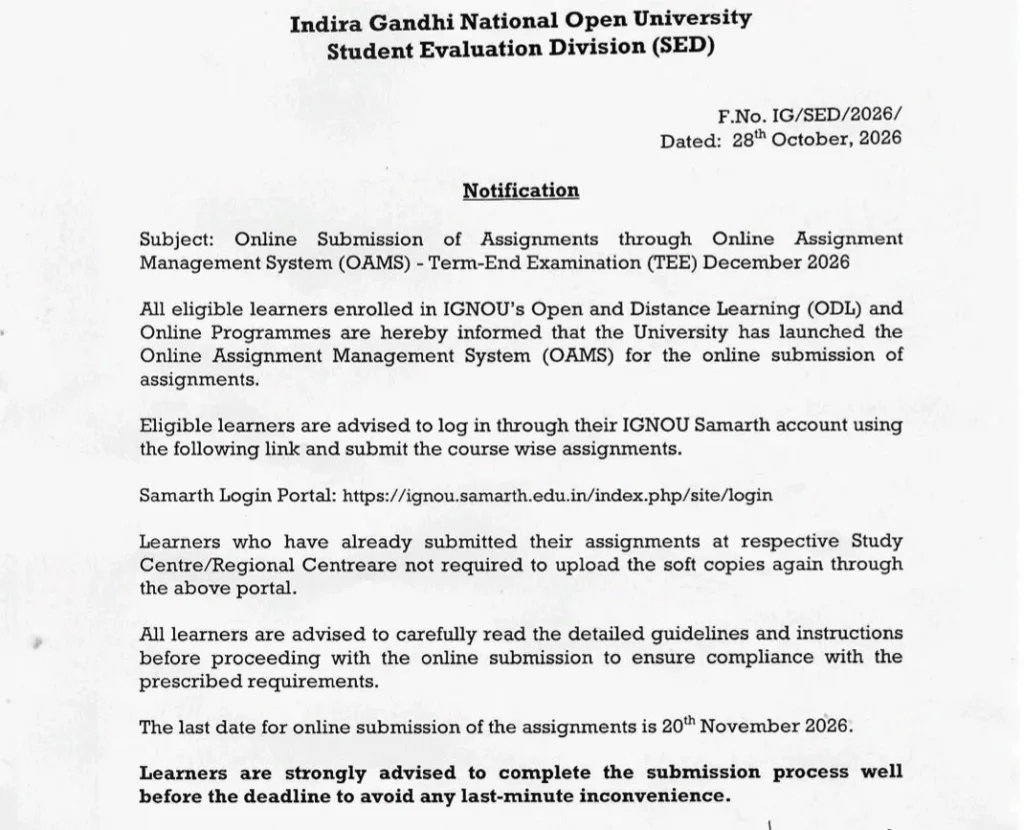
IGNOU Assignment Submission 2026: The Indira Gandhi National Open University (IGNOU) has launched the Online Assignment Management System (OAMS) for the December 2026 Term-End Examination (TEE). According to the notification issued by the Student Evaluation Division (SED) on October 28, 2026, eligible students enrolled in Open and Distance Learning (ODL) and online programmes can submit their assignments through the online system.
IGNOU has advised students to submit their course-wise assignments through their IGNOU Samarth account. The last date for online assignment submission is November 20, 2026.
Students should complete the submission process well before the deadline to avoid last-minute technical problems.
IGNOU Assignment Submission 2026: Important Dates
| Event | Details |
|---|---|
| University | Indira Gandhi National Open University (IGNOU) |
| Assignment submission system | Online Assignment Management System (OAMS) |
| Examination session | December 2026 Term-End Examination (TEE) |
| Notification date | October 28, 2026 |
| Assignment submission mode | Online |
| Last date to submit assignments | November 20, 2026 |
| Login portal | IGNOU Samarth Portal |
IGNOU Assignment Submission 2026 Official Notice:
How to Submit IGNOU Assignments Online for December 2026 TEE?
Students who are eligible for online submission can follow these steps to upload their assignments.
Step 1: Visit the IGNOU Samarth Portal
Open the official IGNOU Samarth login portal. Students can access it using the following link:
Official portal: https://ignou.samarth.edu.in/index.php/site/login
Step 2: Log In to Your Account
Log in using your existing Samarth account credentials. Make sure you access your own account and enter the correct login details. If you cannot log in, check your credentials and use the portal’s available account-recovery options, if required.
Step 3: Open the Online Assignment Management System
After logging in, look for the relevant assignment submission option or instructions for the Online Assignment Management System (OAMS).
Read the instructions carefully before proceeding. The university notification advises students to follow the detailed guidelines and prescribed requirements.
Step 4: Select Your Course
Identify the course or courses for which you need to submit assignments. Prepare the correct assignment files for your enrolled courses.
Important: Check the course codes carefully before uploading files to avoid submitting an assignment under the wrong course.
Step 5: Upload Your Assignment Files
Follow the portal’s instructions to upload the required soft copies. Check the files before submission to ensure they are readable and correspond to the correct courses.
The notification does not specify the permitted file format, maximum file size, or exact upload fields. Students should therefore check the instructions displayed on the portal rather than assume any particular technical requirement.
Step 6: Complete the Submission Process
Follow the on-screen instructions to finish submitting your assignments. If the portal provides a submission acknowledgement or receipt, save it for future reference. After IGNOU Assignment Submission 2026 submission, verify whether the portal displays a successful submission status.
Step 7: Keep Proof of Submission
Save any acknowledgement, receipt, or confirmation available on the portal. Keeping this record can help if you later need to check your submission status or contact the university regarding an issue.
Already Submitted Your IGNOU Assignment? Do You Need to Upload It Again?
No. According to the IGNOU notification, learners who have already submitted their assignments at their respective Study Centre or Regional Centre are not required to upload the soft copies again through the online portal.
Students who have already submitted assignments for IGNOU Assignment Submission 2026 should retain their existing submission proof.
If you are unsure whether your previous submission has been recorded, contact your Study Centre or Regional Centre for clarification before submitting the same assignment again.
What Should Students Do If They Cannot Submit Assignments Online?
Students may face difficulties while logging in, finding the assignment submission option, or uploading files. The following steps can help.
Problem 1: Unable to Log In to the Samarth Portal
Solution:
- Recheck your username and password.
- Make sure you are using the official IGNOU Samarth portal.
- Use the available account-recovery option if you have forgotten your credentials.
- If the issue continues, contact your Study Centre or the university through its official support channels.
Problem 2: IGNOU Assignment Submission 2026 Upload Option Is Not Visible
Solution:
- Check whether you have logged in using the correct account.
- Read the latest assignment submission instructions available on the portal.
- Confirm the applicable submission procedure for your programme.
- Contact your Study Centre or Regional Centre if the option remains unavailable.
Do not assume that the absence of an upload option automatically means you are ineligible to submit assignments.
Problem 3: Assignment File Is Not Uploading
Solution:
- Check the file format and size requirements displayed on the portal.
- Make sure the file opens correctly and is not corrupted.
- Try a stable internet connection and an updated browser.
- If the problem persists, take a screenshot of the error message and seek assistance through official IGNOU support channels.
Problem 4: You Have Already Submitted Assignments at Your Study Centre
Solution:
The October 28 notification states that students who have already submitted their assignments at their respective Study Centre or Regional Centre do not need to upload soft copies again through OAMS.
Keep your submission receipt or other proof safe. If you are uncertain about your submission status, confirm it with your centre.
Problem 5: You Are Worried About Missing the Deadline
Solution:
Complete the IGNOU Assignment Submission 2026 process as early as possible. The last date mentioned in the notification is November 20, 2026. Do not wait until the final day, as technical issues or login problems may delay your submission.
Important Instructions for IGNOU Students
Before submitting assignments for the December 2026 TEE, remember the following points:
- The online submission facility is intended for eligible learners enrolled in IGNOU’s ODL and online programmes.
- Use your IGNOU Samarth account to access the prescribed online submission process.
- Submit assignments course-wise, following the instructions provided by the university.
- Read the detailed guidelines before uploading files.
- Students who have already submitted assignments at their Study Centre or Regional Centre do not need to upload the same soft copies again through OAMS, according to the notification.
- The last date for online submission is November 20, 2026.
- Keep any submission acknowledgement or receipt for your records.
Also read: BEL Probationary Officers Application Form 2026.
Conclusion
IGNOU Assignment Submission 2026 introduced the Online Assignment Management System (OAMS) for eligible learners submitting assignments for the December 2026 Term-End Examination. Students should log in through their Samarth accounts, follow the course-wise submission instructions, and complete the process by November 20, 2026.
Students who have already submitted assignments at their Study Centre or Regional Centre do not need to upload the same soft copies again through OAMS, as clarified in the university notification. Those facing technical difficulties should seek assistance through the university’s official support channels rather than wait until the deadline.
FAQs
Q1. What is the last date for IGNOU Assignment Submission 2026 for the December 2026 TEE?
The last date for online assignment submission, as mentioned in the October 28, 2026 notification, is November 20, 2026.
Q2. Where can I submit IGNOU assignments online?
Eligible students should log in through the IGNOU Samarth portal and follow the instructions for the Online Assignment Management System (OAMS).
Q3. Who can submit assignments through OAMS?
The notification informs eligible learners enrolled in IGNOU’s Open and Distance Learning (ODL) and online programmes about the online assignment submission facility.
Q4. I have already submitted my assignment at my Study Centre. Should I upload it online again?
No. As per the notification, students who have already submitted assignments at their respective Study Centre or Regional Centre do not need to upload soft copies again through the online portal.
Q5. What should I do if the assignment upload option is not available?
Check the instructions on the Samarth portal and confirm the applicable procedure for your programme. If the option remains unavailable, contact your Study Centre or Regional Centre for assistance.
Q6. Should I save proof after submitting my assignment?
Yes. If the portal provides a submission acknowledgement or receipt, save it for your records.